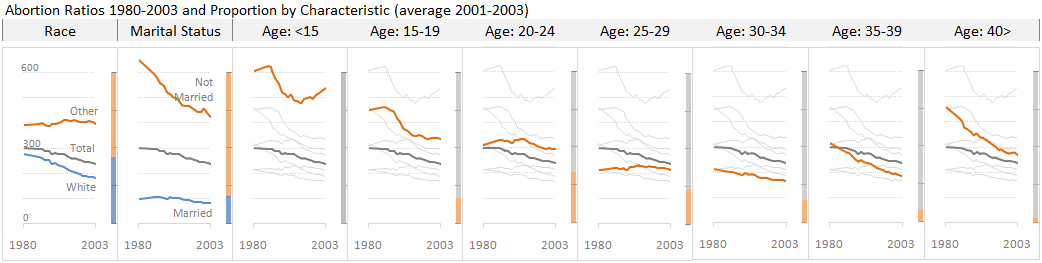
Source: U.S. Census Bureau (original Excel file). The abortion ratio is defined by the number of abortions per 1,000 abortions and live births.
(Click to enlarge)
Notes:
1. We know that information visualization is all about pattern detection. But often our design choices hide relevant patterns behind the obvious one(s). Take this panel, for instance. Everyone can see the downward pattern, but what about the U-shaped pattern across age groups? You can see it, right? Well, follow the usual path and you’ll miss it.
2. A ratio (or a growth rate) is something that should always be put in the context of actual volumes or proportions. There is no “best answer” to link both dimensions but the panel displays a reasonable solution. As you can see, the abortion ratio among women less than 15 years old is very high but its proportion in the total number ob abortions is almost residual. On the other hand, the ratio in the 15-19 age group may be lower, but it is much higher than the average ratio and accounts for around 17 of the total abortions. Whenever possible, you should keep these two measures close together.
3. There are seven age groups in this data set. Put them all together in a single line chart and you’ll miss the pattern across groups, as discussed above, but you’ll also have a hard time disentangling the whole thing. Before creating the chart always ask: what is my specific question? This will help you to prioritize and create a focus-context display. If a series answers your question (need-to-have) add it to the chart and color-code it. If a series is interesting but doesn’t directly answer your question (nice-to-have), you may add it to the chart to provide context, but gray it out and delete if from the legend, if you have one.
Please let me know what you think and suggest ways to improve the panel.
[fusion_builder_container hundred_percent=”yes” overflow=”visible”][fusion_builder_row][fusion_builder_column type=”1_1″ background_position=”left top” background_color=”” border_size=”” border_color=”” border_style=”solid” spacing=”yes” background_image=”” background_repeat=”no-repeat” padding=”” margin_top=”0px” margin_bottom=”0px” class=”” id=”” animation_type=”” animation_speed=”0.3″ animation_direction=”left” hide_on_mobile=”no” center_content=”no” min_height=”none”][Update: Jon discusses the process of pattern discovery in RE: Abortion Ratios 1980-2003. Andreas adds several good suggestions and shows how to display the date in a more consistent small multiples chart.][/fusion_builder_column][/fusion_builder_row][/fusion_builder_container]
One improvement I’d suggest for this chart it to define just what an “abortion ratio” is. If the definition is her, I missed it. Is it abortions-to-pregnancies? abortions per 100,000 women?
The bar charts to the side of each line chart are a clever way to show the distribution of abortions across age groups. Something that remains unclear is to what extent changes in the abortion ratio are due to change in the abortion rate versus the birth rate for a given group (since births and abortions are counted in the denominator of the ratio). The trends in abortion per se as well as the magnitude of abortions by group could be displayed with data on age specific rates of abortion (e.g., abortions per 1,000 women age 20 to 24), if such data is available.
Jorge,
I am a big fan of Trellis and small multiples displays and they help us to understand the nature of multi dimensional data. Here some comments about the charts:
– For most people it’s not clear what an abortion ration is. I would put he definition of the ratio in the title or a footnote (Number of abortions per 1,000 abortions)
– The axes of the Percent Distribution bars are not labeled, and have no scale.
– Using the color Orange for multiple purposes is problematic. I needed some time to understand that the Orange line in the Panel charts is the abortion ration for that particular age group
– Not sure if you need to show the all age groups in the Age group charts as light Grey lines. I know that you want the reader to compare the current age group in the context of the other age groups but this competes with the small multiples design, it’s almost redundant.
– I would add some white space between the Age group charts, the Race and Martial Status charts, to make clear that we compare here a different variable
Andreas
Jorge,
You show an integrated line chart for Marital State and for Race but a Trellis chart for Age Groups. For a consistent chart reading I would use Trellis charts for all variables.
Andreas
I’d question whether you need that average abortion line. As we can see from the charts, the abortion rate is very different across the age groups so calculating an age-agnostic average isn’t representative of anything. If you drop that line the charts would be clearer to read and that U-shape would jump out more.
Rob
Here our Small Multiples Chart of Abortion Data 1980-2003
http://blog.xlcubed.com/small-mutiples-abortion-data-1980-2003/
Andreas
Here our version of the small multiples chart:
http://blog.xlcubed.com/small-mutiples-abortion-data-1980-2003/
Andreas
I tried to incorporate some of the suggestions in this version of the abortion data chart
http://blog.xlcubed.com/small-mutiples-abortion-data-1980-2003/
Andreas
I’ve extended Jorge’s and Andres’ panel chart one step further:
Re: Abortion Ratios 1980-2003
I’d also like to include panels showing behavior across age groups within a panel, one panel per year, but that seems like a lot of effort. Perhaps I could do every fifth year rather than every year.
@ Dave: Thanks Dave, I updated the post with the reference.
@ Conrad: This specific data set don’t include abortions per 1000 women but I saw that ratio somewhere else.
@ Andreas:
– No scale in the bar charts: it is assumed that the total bar is 100%, but you are right, is shouldn’t be assumed, it should be told;
– Right, orange for multiple purposes: the first age group should be labeled;
– Gray lines: I actually like some level of redundancy, as long as it doesn’t interfere with the message. I conducted an informal test with a similar chart and the users told me they prefer this version because it provides context (it is difficult to compare series across multiple charts); of course you may have a different feedback;
– Space between series: there are vertical lines in the header, but perhaps that’s too subtle…
– Line chart vs. Trellis: I would say that in this case, and with this specific technology (Excel) a small level of inconsistency is tolerable because there doesn’t seem to be much added value by splitting the line charts in two;
@ Rob: The global ratio may be more abstract, but it is an accepted reference to compare performance in specific groups of the population.
I like the light gray redundant lines in the panels showing data highlighted in other panels. They are not necessary, though, and overall the chart looks a little cleaner without it. In the dynamic charts I posted with my related post, the gray lines are a must, because there is only one panel.
I also agree with Jorge about using multiple series lines in the first two windows in his chart. The small inconsistency is hardly noteworthy, and a three-panel-wide view is hardly worth separating the chart into panels. When I first looked at Jorge’s chart, in fact, I thought nothing of the inconsistency, but instead thought it was an elegant way to show two additional cross-sections of the data. A darker line between these panels may help separate these two panels from the age group panels.
My point is that some of the difficulty in data visualization is created by nature of the data itself. This data factors out age-specific propensity to get pregnant. It answers the question, “What is the trend in the likelihood that women who get pregnant will have an abortion between 1980 and 2003?” Different data is suited to answering the question, “What is trend in the count of abortions per 1,000 women of a given age over time?” To answer the latter question age-specific abortion rate information is appropriate. Given such data, a panel of age-specific line charts would be sufficient to tell the story. I am not criticizing the chart above but responding to the “best answer”/both dimensions discussion. In this case, the “best answer” may be more appropriate data, though the convenience and availability of that data is a separate matter.
Here my version of the data set
Andreas
I didn’t manage to use the HREF tag 😉
Here my version of the data set as a graphical table using sparklines
http://blog.xlcubed.com/graphical-table-abortion-1980-2003/
Andreas
In my personal experience, it does’t matter how well you answer a question, as soon as you answer it, more questions are asked.
Gabriela: that’s why Jacques Bertin says a chart is interactive by nature. Knowledge is built by the user during that interaction.
I greatly appreciate the gray lines maintaining context and the bar charts maintaining scale and the relationship between the charts.