Become the Dashboard Master in your organization.
Take your dashboards to the next level with advanced lookup and aggregate functions!
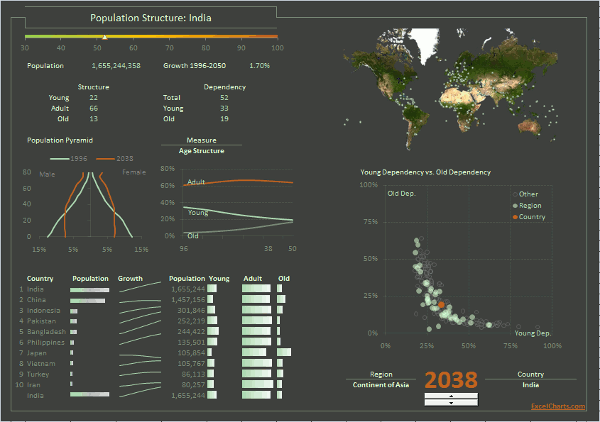 I know what you are thinking: “that’s not an Excel dashboard”. Well, it is an Excel dashboard, and if you follow this tutorial you will learn how to replicate it. Then you can use that knowledge to design an even better looking dashboard: your own.
The Lookup Edition of the Demographic Dashboard is a step-by-step video tutorial that takes you from a blank sheet to a fully functional dashboard. You will learn how to use advanced Excel formulas like OFFSET() or DSUM() and, unlike the VBA Edition tutorial, you do not have to leave the familiar Excel environment and you do not have to write a single line of code.
How it works
A 14-module course that shows you every single step I took to create the dashboard above. This dashboard contains:
- Forms that allow the users to interact with the data;
- How to use an Excel database;
- Dynamic charts that change when the data changes (based on user selections);
- Advanced Excel functions like OFFSET() and INDIRECT() or DSUM();
- More than two hours of video;
- The Excel dashboard itself;
- The external data source.
Now, while you learn how to make Excel charts like a pro, you can apply these best practices to your dashboards. Get access to two dashboard tutorials, more than three hours of step-by-step videos that will help you unleash your creativity and create great dashboards using Excel. And you also get access a growing number of bonus files that you can explore and use to improve your Excel skills.
(Two dashboard courses only $97.00. 24-month access to the tutorials, 30-day, no questions asked, full money-back guarantee. Pay securely with your Paypal account. You’ll get a message from Amazon with a link to your gift a few hours after your purchase.)
The course is right below, let’s get started!
The Demographic Dashboard Lookup Tutorial
Each of the images below links to the page modules. If you need to login first, use the form in the page footer.
To tell you the truth, I don’t like the word “lie”: it feels obvious and unsophisticated. I prefer something like “reframing truth”, “alternative facts” or an English word I recently…
I’m still in shock. Such a stupid Excel mistake. I should know better, but it was Monday, so… Let me tell you about it. It’s as mistake as old as…
A single horizon chart is easy to make in Excel using overlapping columns or areas (the trick is to structure the data the right way). But the horizon chart is…
I need to learn PowerBI, as soon as possible (per client request). So, I spent much of last week using it. I wrote about the depressing experience on Twitter. I…
When I saw Paris for the first time I was like, meh. Not Paris’ fault. This was the second leg of a trip that started in Prague, and I was…
How do Excel and Tableau compare when actually making a chart? I couldn’t find such post, so I wrote one. I’ll create a simple chart, a population pyramid, and comment…
After creating wordless instructions for making charts in Excel, here is the Tableau version. This post discusses similarities and differences between both tools. Check out the e-books at the bottom!…
An ebook that uses visual instructions to show how to make charts in Excel. Non-English speakers should be able to follow these instructions.
It began with a tweet: Data tweeps: Help! I need to become a competent data viz thinker, well, immediately. Are there “must-read” sources that y’all can suggest? — Lindsey Leininger…
This post summarizes a few key points in my NTTS2017 effective data visualization for statistical offices